
Overview Tool
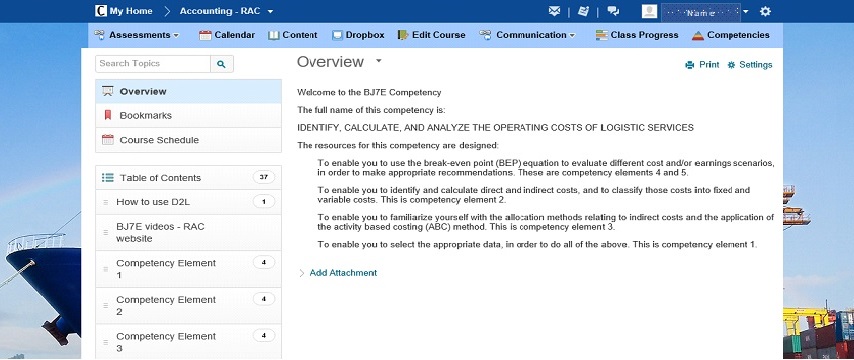
Screenshot of Overview section
- What is the Overview Tool?
- Why would you use the Overview Tool?
- Video Tutorials: Overview
- Video Tutorials: Calendar (Course Schedule)
- Take Aways: Syllabus Template and HTML Editor Guide
What is the Overview Tool?
This is the area where the user can read a brief overview about the course offering, tips and tricks, how to navigate the content, how the weeks/sessions/modules will be laid out, directing questions and or to review an introduction video about the course.
Why would you use the Overview Tool?
In order to better manage learner expectations it is important to provide as much information as possible on course requirements, learning outcomes and the assessment criteria.
The Overview section of your D2L Brighspace section can be used to add a welcome message, course description, assessment materials and more. Review the information below on the types of data that can be included under Overview.
- Welcome to the course! Create a short welcome message to the class. Be enthusiastic and positive about their upcoming learning journey. If you have an introductory or course orientation video, you might want to post it here.
- Course description: Provide a general overview of the course with expectations on what learners will learn.
- Syllabus: A place to add your syllabus. The use of a common template is efficient, allows the program to brand itself with a common look and feel, and provides a consistent ‘face’ to the learner. Click here for a proposed Syllabus Template (Word). You are welcome to use and modify it for your needs.
- Contact Information and Bio: Introduce yourself by providing contact information and uploading your bio.
- Assessments & Assignments: For the various assessments in the class. include descriptions, grading guidelines (and/or rubrics), mock exams, example tests, assignment worksheets, or templates, anything that will manage learner expectations concerning learning outcomes for the course.
- Learning outcomes: Course and or lesson objectives, performance criteria are an excellent way to manage learner expectations.
- Resources: A list of resources needed for the course such as textbook information, links, articles and other information learners will need to succeed in the course.
Something to Keep in Mind: Depending on the course some or all of the information above could be placed under Table of Contents instead of Overview. Check – Screenshot of Overview section above to see placement of Overview section and Table of Contents section within a D2L Brightspace course.
Video Tutorials: Overview
Create an Overview
Create an Overview – Course Example Astronomy
Adding Course Overview information under Table of Contents - University of Calgary
Video Tutorials: Calendar
This feature can provide students with information on due dates and other scheduled events related to a course.
Calendar - Create an Event
Calendar - Set Date Availability for a Calendar Event
Take Away
- Download: Course Outline Example Syllabus Template (Word)
- Download: HTML Editor Guide (PDF)
- Review Content Tool section of this tutorial for more information on integrating content under Overview and Table of Contents.
Desire2Learn and the molecule logo are trademarks of Desire2Learn Incorporated, registered in the U.S. and other countries.
For client use only. All rights reserved.