
Rubric Tool

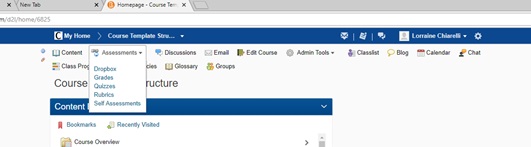
Screenshot of Rubric section
- What is the Rubric Tool?
- Why would you use the Rubric tool?
- Scenario 1: Assessment Rubric
- Scenario 2: Learning Models
- Video Tutorials: Rubrics
- Your Turn Activity: Building a Rubric
What is the Rubric Tool?
Rubrics are used to evaluate an activity or item based on a predefined set of criteria. They help ensure that activities and items are evaluated fairly and consistently.
- What is a Rubric? To learn more about what a rubric is and how to create one for your course assessments click here.
Why would you use the Rubric tool?
Use the Rubric Tool in your course to:
- Develop a matrix that will be used for assessment
- Promoted consistency when assessing learners
- Providing expectations and assessment requirements prior to assessment
- Justify and communicate evaluations of learners
- Define what quality entails
Scenario 1: Assessment Rubric
Professor Murray teaches a basic composition course. The entire English department agreed on a Rubric to evaluate student writing assignments. As students submit their assignments to the Dropbox folder she is able to assess them based on the Rubric. She finds it takes much less time to do her grading because she can just check off the relevant performance levels on each criterion. She is able to provide custom feedback as needed in addition to Rubric feedback which allows her to provide additional student support.
Max Edwards is a student who is about to start working on a writing assignment for his course. He visits the Rubric in advance to see the criteria for this assignment. When he receives his feedback following his submission of the assignment he is able to identify the areas of strength and where he can improve.
Benefit to the Professor/TA/Instructional Designer
The Rubric tool allows criteria for assessments to be clearly communicated to all students. Via the use of a Rubric for assessment, consistency is increased as all students are assessed against the same matrix.
How does it enhance my teaching?
The Rubric provides very structured and detailed feedback to the student.
How does it enhance my student’s learning?
Rubrics provide detail about how students will be assessed and what is required prior to attempting an assessment activity.
Scenario 2: Learning Models
Professor Collins teaches Advanced Composition and has a lot of examples of what constitutes good writing. He wants his students to learn how to recognize good writing so that they can apply those evaluative criteria to their own work. Rather than providing the rubric himself, he decides that students would learn more by helping to develop the rubric. He provides them with writing examples and asks them to evaluate each sample and develop a rubric which will help with this task.
Marty Tastoria is a student in Professor Collins class. He engages in the discussion that examines examples of assignments and participates in the creation process of a new Rubric. Using the Rubric Marty completes his assignment for the course.
Benefit to the Professor/TA/Instructional Designer
The Rubric tool enables students to be part of creation of the assessment criteria for a project.
How does it enhance my teaching?
Rubrics can be used to support teaching based on samples or models where the instructor provides a range of sample documents that demonstrate varying levels of quality and mastery. Using these examples, the instructor can collaborate with students to develop a rubric and apply it to the provided examples. The class can then re-use the rubric for their upcoming assignment which requires them to create a paper similar to the samples provided.
How does it enhance my student’s learning?
By allowing students to be a part of the creation of the rubric and the process of defining assessment it helps them understand the criteria and performance levels chosen for evaluation.
Video Tutorials: Rubrics
Rubrics - Create an Analytic Rubric
Rubrics - Create a Holistic Rubric
Rubrics - Add a Rubric to an Existing Activity
Your Turn Activity
Building a Rubric
Any access issues with Rubric contact Champlain’s D2L Brightspace administrator.
Access Rubric section under Assessments, see side bar
- Click new Rubric
- Enter name
- Set the status of Rubric to published
- Select the type of Rubric
- Select scoring method
- Enter levels and criteria information (Levels and Criteria tab)
- Click save
- Click edit Rubric
- Change the Rubric name
- Click save
Note: Your menu bar might not have all the same items as screenshot.
Try this Challenge
Create a two Criteria Rubric
- Create a Rubric that has two criteria and three levels that provide pre-configured feedback for every cell.
Desire2Learn and the molecule logo are trademarks of Desire2Learn Incorporated, registered in the U.S. and other countries.
For client use only. All rights reserved.